Apple iPhone

Thursday, August 5, 2010

8 Problems with iPhone 4

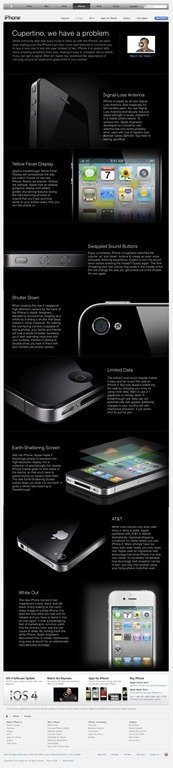
Since the launch of iPhone 4, many issues have been reported with it such as reception issues when you touch its antenna band. It also has some display discoloration issue but Apple says they go away with time.The glass (front and back) of iPhone 4 is shattered if you drop it from average height and some are saying it has also some proximity issues which are causing hang ups during calls. So, seeing all these problems, teqnolog has shared an amazing image in which they have highlighted the eight problems of iPhone 4.
iphone-41

Although iPhone 4 does have some issues, this image criticizes it a little too much. It is expected that the antenna band ‘death grip’ issue of iPhone 4 would be solved with iOS 4.01 update this Monday.

Related posts:

  1. iPhone 4 Recall NOT announced. It’s just a rumor!
  2. iPhone 4 Proximity Issues Causing Problems During Calls
  3. iPhone might issue iOS 4.01 update on Monday to Fix Antenna Band ‘Death Grip’ Issue
  4. Some iPhone 4 have Camera Coloring Problems. Really?
  5. Steve Jobs on iPhone 4 reception issue says ‘Stay Tuned’

Secure your iDevice After Jailbreaking with JailbreakMe Using PDF Loading Warner

Comex has already released his universal jailbreak for each and every iDevice (iOS 4.0, 4.0.1).To apply the jailbreak solution, you need to visit to jailbreakme.us with mobile Safari, then slide with finger-tip is enough to make your unit free from Apple’s restrictions.

Since JailbreakMe has been released, and that the exploit is public, hackers can make use of this exploit by making you download a PDF file in Safari, in the process installing some malicious code to ultimately take control of your iOS device.

Solution : PDF Loading Warner

cdevwill member of chronic dev-team released a little utility called PDF Loading Warner. After installing this little package if you visit to the “malicious site” you will get a pop-up to warn you about danger, you must logically deny the execution of the code. If you are downloading a file from a trusted source, click “Load”, otherwise “Cancel”.

Installation Procedure

1. Make sure you are jailbroken and on WiFi or 3G.

2. Launch Cydia and search for “PDF Loading Warner”.

3. Install PDF Loading Warner and restart the springboard after the installation.

4. Now you’ll be warned every time any site trying to inject malicious code in form of pdf file.

Sync Your iPhone/iPad With iTunes Over 3G with Wi-Fi Sync 2.0

Developer Greg Hughes of Wi-Fi Sync has announced a new version of Wi-Fi Sync over 3G and VPN.

Wi-Fi Sync 2.0 is in the works: lots of bug fixes, proper iPad/iPhone 4 support… oh, and sync over 3G and VPN with no extra configuration.

Currently, Wi-Fi sync allows you to sync your iDevice with iTunes over Wi-Fi when connected to the same network as your computer. The ability to sync from a remote location will be a welcomed improvement.

Ultrasn0w unlock for iPhone 4 on iOS 4.0.1 Released

The iPhone Dev-Team has released the carrier unlocking tool called Ultrasn0w for US based iPhone 4 users.

They are now free to legally distribute their application without any worry that they would be targeted for a lawsuit. The dev team also has announced great news for iPhone 4 owners today. They have released the updated version of their unlocking/jailbreaking tool, now supporting iPhone 4 users.

According to The Dev Team Blog, “It’s the moment that many of you have been waiting for: the Dev-Team’s ultrasn0w carrier unlock for iPhone 4 is out. You’ll find version 1.0-1 of ultrasn0w in Cydia on jailbroken devices.” Jailbreaking is the act of freeing the iPhone from the restrictions that apple’s default settings provide. It allows users to install custom software from a wide variety of different places without the need to use the iTunes App Store.

Jailbreaking has been extremely popular among the technology enthusiast community. Unlocking allows users to use the phone on a carrier other than AT&T, as well as install custom themes, home screens, and applications not available in the app store.

How to Unlock iPhone 4 iOS 4.0.1 with UltraSn0w 1.0-1 ?

UltraSn0w 1.0-1 has released to unlock for iPhone 4.If you don’t know how to unlock iPhone 4 iOS 4.0.1 with ultrasnow 1.0-1 i’ll give you a complete how to guide.

Keynote:

* Your iPhone 4 must already be jailbroken.

* UltraSn0w can unlock iPhone 4 baseband 01.59.00.

Disclaimer: Please do it with your own risk.

Steps to Unlock iPhone 4 with UltraSn0w

***T-Mobile USA users please disable 3G network first.*** Settings >General >Network and turn the “Enable 3G” switch to OFF.

Assuming that your iPhone 4 is already jailbroken:

* Open the Cydia.
* Go to manage Tab at bottom.
* Hit the big Sources button.

* Hit the Edit button on Top-Right
* Then Hit the Add button on Top-Left
* Then Enter the following URL: http://repo666.ultrasn0w.com and hit the Add Source button.

* Once the Source is added to the Cydia, hit the big return to Cydia button at bottom of the screen and then Done button.
* Go to Search tab and search for ultrasn0w and install it.


Installing UltraSn0w will unlock iPhone 4 iOS 4.0.1, 4.0 with baseband 01.59.00. Once the installation is completed, reboot your iPhone 4.

You have unlocked iPhone 4 baseband 01.59.00 with UltraSn0w 1.0-1 and can use SIM from any carrier now.

Details Specs about iPods, iPhone 5, Bumper 2 + iPad mini On 2010-2011

Apple has planned to launch its next generation iPhone 5 as early as in January 2011 because of the antenna issues with the iPhone 4.In addition to iPhone 5, Apple might also unveil 7-inch version of the iPad either later this year or early in 2011.

1. New iPods. Apple apparently has three new iPods ready to go as early as this month, or as late as September. One is the new iPod nano, one is the new iPod touch, and the third one is a question mark, but may be a small (1.7”) touchscreen replacement for the iPod shuffle. There’s also continued chatter about a three-inch touchscreen that could make its way into an iPod, shaving half an inch off the diagonal of the current iPod touch.

2. New iPad. A seven-inch-screened version of the iPad is substantially finished and will be ready for announcement either later this year or early in 2011. Apple has been prototyping devices with screens of this size for a long time—quite possibly predating the original iPhone.

3. New iPhone. According to our source—and we have to say that we find this part hard to believe—Apple is pushing up the release date of the fifth-generation iPhone to early 2011 (as soon as January) because of the antenna issues with the iPhone 4. It’s unknown whether this will be a repackaging of iPhone 4 components in a different shell or something more substantial. We reiterate: it’s hard to believe. But as with so many seemingly far-fetched early reports, it’s not impossible.

4. iPhone 4 Bumpers, Generations 0 and 2. To reduce the cost of the current iPhone 4 Case Program, the company is currently working on a less expensive all-silicone version of the Bumper to give away after September. Our source says that the original, unreleased version of Bumper had more hard plastic than the final version, and claims that Apple was considering giving Bumpers away with every iPhone 4 before deciding to take its chances with the bare device. The question is whether the Bumpers were originally intended for glass protection or antenna coverage, and why Apple developed them in the first place.

CLEAR iSpot for Apple’s iDevices Announced by Clearwire

Clearwire has announced the CLEAR iSpot, a personal hotspot with dedicated support for Apple’s devices, including the iPad, iPod touch and iPhone.

The iSpot is CLEAR’s first 4G personal mobile hotspot made exclusively for Apple mobile products, including iPad, iPhone, and iPod touch devices. iSpot users can share 4G speed with up to eight Wi-Fi-enabled Apple mobile devices simultaneously. The CLEAR iSpot’s ergonomic design and white casing were specifically designed to complement the iconic image of Apple products.

Using CLEAR super fast mobile internet service, Apple’s iPad, iPod touch or iPhone can access a rich mobile broadband experience with average mobile download speeds of 3 to 6 mbps with bursts over 10 mbps. For example, using the CLEAR iSpot an iPad user can stream unlimited movies or television shows via the Netflix app from home, work or on the go, while an iPod user can stream Pandora music or live sports play-by-play on the commute home.

The iSpot is available nationwide from http://www.clear.com today and available in CLEAR retail stores and authorized dealers beginning August 10. The iSpot has an MSRP of $99.99 and users can enjoy unlimited 4G data usage for an initial low monthly service offering of $25 without a required term contract.